Avalonia vs WinUI 3
The same XAML and C#, two different assumptions about where your app will run. What each one costs, which to choose for what, and how to ship a first-class Windows app without making Windows permanent.
How they differ
Both draw their own controls. Only one brings the whole stack with it.
WinUI 3 is the native UI layer of Windows, shipped through the Windows App SDK and inseparable from it. Avalonia ships the same kind of stack as a library inside your app: Skia for rendering, a windowing backend per operating system, and nothing underneath but .NET. Nearly every difference on this page follows from where that stack lives.
Skia and the platform backends compile in beside your code.
Composition, controls and input ship with the Windows App SDK.
One UI stack that goes wherever .NET goes, because it travels inside the app.
The operating system’s own UI stack, present exactly where that operating system is: Windows 10 1809 and later.
Why it matters
The third row decides the fourth. A UI stack that ships as a component of Windows runs precisely where Windows runs, which is not a defect: being the platform is WinUI’s job. A stack that ships inside the app runs wherever .NET and a GPU, or a framebuffer, exist. That one packaging decision is why the same Avalonia project reaches six platforms, and why choosing between these frameworks comes down to what you’re willing to assume forever.
What stays open
Five targets the same project keeps.
None of these is a port or a sister codebase. They’re what the first section already paid for: when the UI stack compiles into the app, a new platform is a new backend for the stack, and these are the ones that exist today, tested and published in the support matrix.
macOS
A first-class target, with its own native backend.
Native Objective-C++ backend, written and maintained by us. Apple silicon and Intel, shippable as one universal binary, with no Mac required to compile. macOS on Avalonia.
Linux, desktop to panel
From the workstation straight down to the framebuffer.
X11, Wayland, DRM or framebuffer windowing from one build, so the same project serves a laptop, a kiosk and an embedded panel down to Raspberry Pi OS. Linux on Avalonia.
iOS and Android
The same views, hosted natively on both phones.
Native iOS and Android integration: one Avalonia view hosted by each platform, not a web view, drawn by the same renderer as your desktop build. Mobile on Avalonia.
The browser
The same app, served like a website.
Skia through CanvasKit, drawn to a WebGL canvas and served from static files with no server-side component, in any browser with full WebAssembly support. WebAssembly on Avalonia.
The decision underneath
A UI framework is a ten-year decision. The platform list shouldn’t be signed in week one.
If your requirements genuinely begin and end with Windows, WinUI holds up, and the next section says so without flinching. The catch is that products outlive their first requirements, and these are the ordinary ways “Windows-only” stops being true.
A customer standardises on other hardware.
The deal that funds the product’s next year arrives with macOS or Linux in the requirements. The UI layer decides whether that’s a build target or a second application.
The deployment environment moves.
The product gets embedded in a kiosk, a panel or a production line, and the hardware runs Linux. A stack that lives in Windows can’t follow it there.
Part of the product needs to reach the browser.
A viewer, a configurator, a dashboard for people who’ll never install anything. With the UI stack inside the app, the same views compile to WebAssembly.
The team stops being Windows-only before the product does.
Developers on MacBooks, build agents on Linux. WinUI development requires Windows end to end; Avalonia development runs wherever the team already is.
Which one, for what
Sometimes the answer is WinUI.
The trade is real. WinUI buys the deepest possible alignment with Windows at the price of being scoped to it; Avalonia buys the platform list at the price of implementing Fluent rather than being it. Which price is right follows from what the app is for.
Choose Avalonia when
You’re building a .NET product, not a Windows product.
- macOS, Linux, mobile or the browser is on the roadmap, or might ever be. The whole point is that you don’t have to know yet.
- The app should look like your product on every platform, with each control restylable to the template.
- There’s a WPF codebase in the building, because the dialect is close and Avalonia XPF exists for lift and shift.
- Deployment needs to stay plain .NET: self-contained publishing, no separate UI runtime, Windows builds from any CI.
WinUI 3 is a fair choice when
The app is Windows, deliberately and permanently.
- It’s a Windows system utility, a Windows-specific client, or a product whose scope is a policy rather than this year’s requirement. This is the case Microsoft recommends WinUI 3 for.
- The current Fluent design language and the direction of the Windows shell are the product, not a theme it wears.
- The UI needs to be written in C++, which WinUI supports and Avalonia doesn’t.
Shipping today
Shipped, with the option open.
A launcher that lives inside the Windows shell, a low-code studio on two desktops and a design application on three: applications whose users would notice a compromise, each built on the stack that travels.
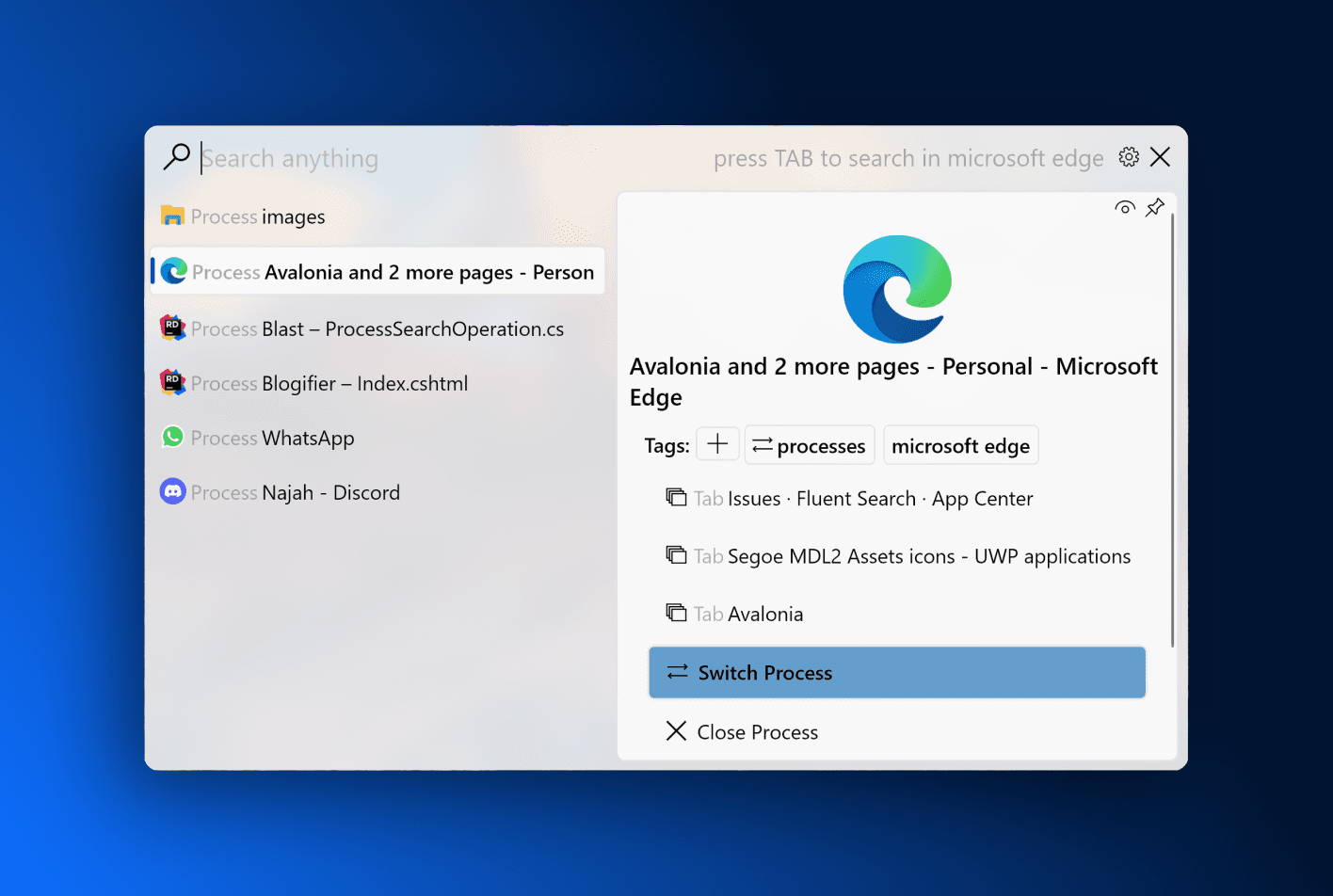
Fluent Search
Instant application, file and browser-tab search for Windows 10 and later. A Windows-only product that still chose the in-app stack.
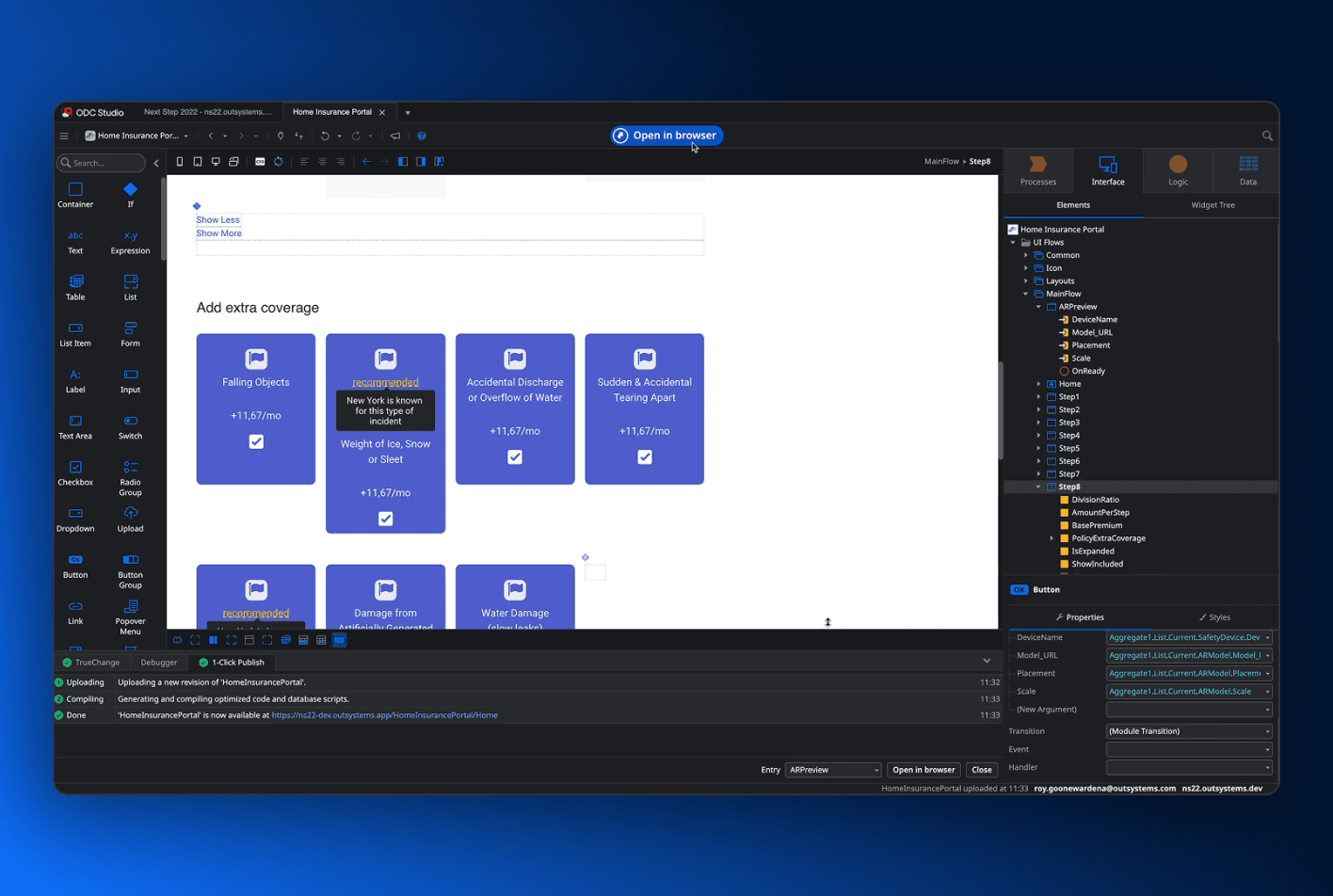
ODC Studio
The desktop studio for the OutSystems low-code platform, shipped for Windows and macOS from one project.
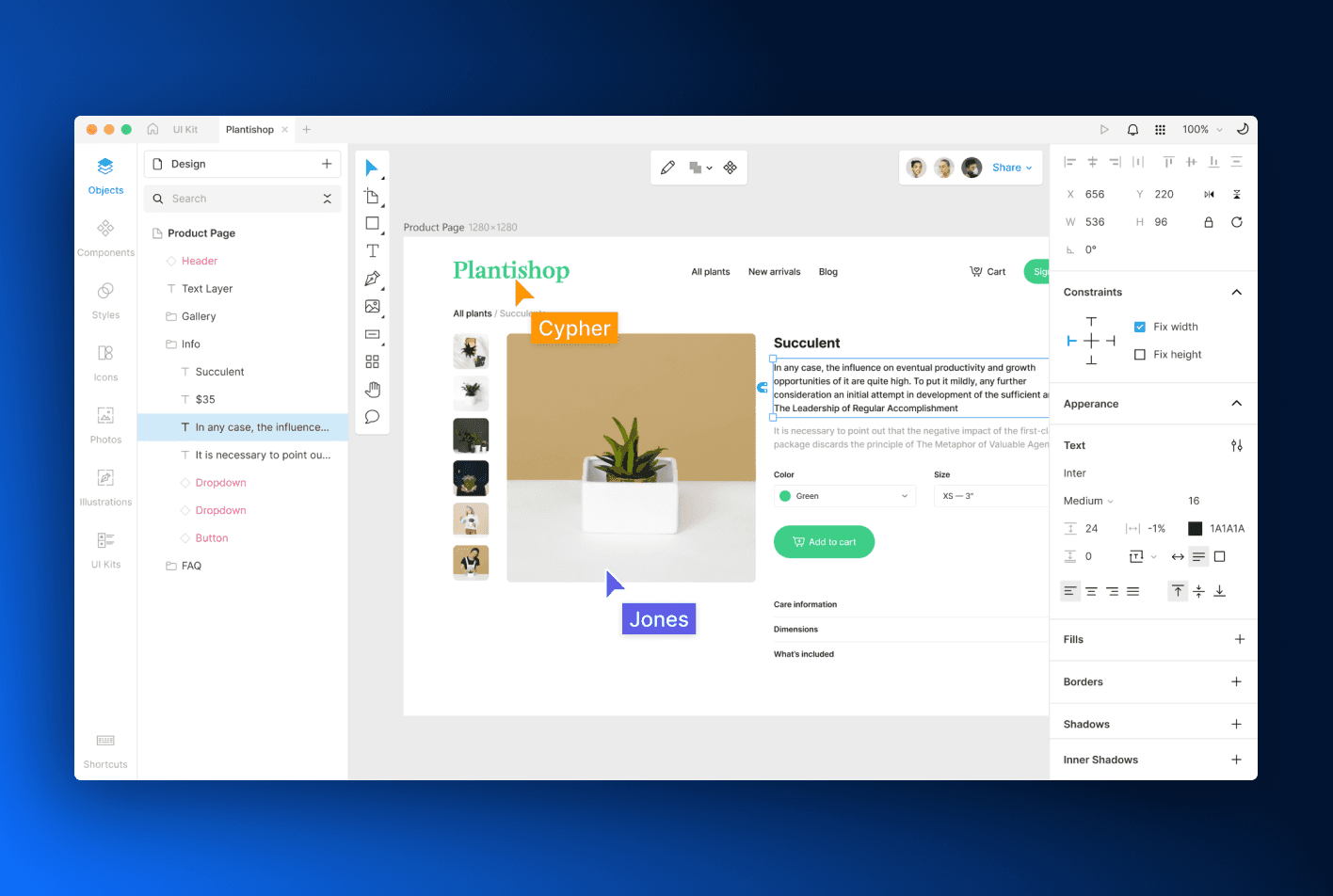
Icons8 Lunacy
A full graphic design application with built-in AI tooling, shipped for macOS, Windows and Linux.
The working week
The differences you feel before you ship anything.
Framework choices get made on architecture and lived on tooling. Three differences that show up in the first week, and none of them is about controls.
Where you develop
Three operating systems, three IDEs.
WinUI development requires Windows, with Visual Studio recommended by Microsoft and command-line tooling supported. Avalonia development runs on Windows, macOS and Linux, in Visual Studio, VS Code and Rider, and a Windows build can come off a macOS or Linux machine.
What you see while you work
A live previewer, in all three IDEs.
The Visual Studio XAML Designer doesn’t support WinUI 3; Microsoft’s guidance is XAML Hot Reload and inspecting the running app. Avalonia tooling draws your XAML as you type in all three IDEs, and Avalonia DevTools inspects the running app, with an MCP server so your agents can too.
How it ships
A standard .NET publish, nothing to install first.
A WinUI app is packaged with MSIX by default, and an unpackaged one needs the Windows App SDK runtime installed with the app or bundled into it. An Avalonia app is an ordinary .NET publish: framework-dependent or self-contained, MSIX only if you want the Store, and Parcel builds the installers and signing for every target from one run.
Side by side
The whole comparison, including the rows WinUI wins.
Twenty-seven rows, no ticks and no crosses. Where the two frameworks answer the same way the row is set back, and where WinUI has the better answer the cell says so, because a ledger that only quotes the rows it wins is an advert.
Where it runs
Where the UI stack lives
What you bring with you
What ships with it
Who stands behind it
WinUI rows were checked against Microsoft’s published pages in August 2026: the Windows App SDK overview, its deployment documentation, the Community Toolkit DataGrid note and the WinUI repository. When Microsoft’s documentation changes, so should this table; tell us if we’re behind.
FAQ
The questions
that decide it.
If you’re weighing this up for a real codebase and something here doesn’t cover it, ask us directly.
It’s Microsoft’s recommended platform for new native Windows desktop applications, and if your app is deliberately and permanently Windows-only, taking that recommendation seriously is reasonable. The comparison starts to matter when “a Windows app” describes today rather than the product. WinUI makes Windows a compile-time assumption; Avalonia makes Windows a deployment target, and keeps macOS, Linux, mobile and the browser reachable from the same project.
Most of it. Avalonia is XAML and C# with the same MVVM patterns, data binding, resources and templated controls, and the job x:Bind does is done by compiled bindings. The main things to relearn are Avalonia’s selector-based styling system and the control library.
No, and this comparison doesn’t need it to be. Windows App SDK 2.0 reached stable in April 2026 with further stable releases since, in May 2026 the WinUI team published a performance push naming startup time and responsiveness as priorities, and Microsoft continues to recommend WinUI 3 for new native Windows applications. The open question is your application’s future, and whether it should be limited to Windows.
Generic framework benchmarks won’t survive contact with your workload, so the answer is: benchmark your application. Both stacks are hardware-accelerated and both teams are investing. Microsoft named startup time and responsiveness as 2026 priorities, and Avalonia 12 rebuilt its renderer around deferred composition and dirty-rectangle tracking, measured at a 1,867% peak frame-rate gain over 11.x on its 350,000-element release benchmark. What Avalonia changes is that reaching your Windows performance target doesn’t require adopting a Windows-only architecture.
Not for the UI layer, no. Avalonia is a .NET framework: the interface is written in C# or F#, and WinUI’s C++ support is a genuine differentiator if your UI must be C++. Plenty of Avalonia applications keep performance-critical C++ underneath and call it through P/Invoke, but if the requirement is C++ end to end, WinUI is the better fit.
Views port to Avalonia’s XAML dialect, which reads as familiar; view models and business logic typically move unchanged; x:Bind becomes compiled bindings; and WinRT calls keep working on Windows, though anything platform-specific needs an abstraction before it runs anywhere else. It’s a port of the view layer, not a rewrite of the application. The docs’ WinUI migration guide maps each concept to its equivalent, down to VisualStateManager versus selectors. Start with one screen and measure it, rather than trusting a comparison page.
Build for Windows today. Keep tomorrow open.
Avalonia is MIT licensed and works with the .NET SDK you already have. Ship a first-class Windows app now, and decide where it runs when your business does.