Avalonia vs .NET MAUI
Similar code but very different architectures. What changes, when to choose which, and how a MAUI app can reach Linux and the browser without a rewrite.
How they differ
Similar code. Very different architectures.
.NET MAUI acts as an abstraction layer over existing native UI toolkits. When you ask for a button, you get the underlying operating system's button, which restricts you to a lowest-common-denominator API.
Avalonia brings its own UI toolkit and draws every control itself, so the same control renders the same way on every platform it reaches.
One renderer. Every control, every platform.
One widget set, drawn by us, identical everywhere it runs and portable to anywhere Skia is.
Four widget sets to reconcile on every release, and a layer whose job is hiding the differences between them.
Why it matters
The third row decides the fourth. A wrapped framework can only reach platforms whose widget set someone has wrapped, which is why Linux and the browser aren’t on its bottom row and why every operating system release adds to the list of differences it has to reconcile. Avalonia answers “what draws a button” once, so a fix on the desktop is a fix on the phone, and a new target is a new Skia backend rather than a fifth widget set.
What it buys you
Three targets that come with drawing your own controls.
None of these needed a special case. They’re what happens when the framework already owns the renderer, so a new platform is a new Skia backend instead of a fifth widget set to wrap and maintain.
Desktop Linux
A tested target, not a community port.
Windowing through X11, Wayland, DRM or framebuffer. Rendering with Skia on OpenGL or EGL. Ubuntu 25.x, Fedora 43 and Debian 13 Trixie are tested against every release, and Ubuntu 16.04 onwards is kept working. Linux on Avalonia.
Embedded Linux
Straight to the framebuffer, with no desktop underneath.
DRM and framebuffer backends across x64, ARM64 and ARM32, down to Raspberry Pi OS. The same project builds for the workstation and for the panel, which is the part that makes an HMI a .NET project rather than a second team. Embedded targets.
The browser
The real .NET runtime, in the tab.
Skia through CanvasKit, drawn onto a WebGL canvas. .NET 8.0 or later, served from static files with no server-side component. WebAssembly on Avalonia.
Which one, for what
Where each one is the stronger choice.
The trade is real: wrapping the operating system’s widgets buys you a button that behaves like every other button on that device, and drawing your own buys you the same app on every device plus the platforms nobody has wrapped. Which side you want follows from what the app is for.
Choose Avalonia when
The app is the product, and it has to look like yours everywhere.
- It’s a branded, line-of-business or industrial application, where the design system matters more than matching the host’s widgets.
- Linux, embedded Linux or the browser is on the roadmap, or might be.
- There’s a WPF codebase in the building, because the XAML dialect and the migration path are built for it.
- You want every control restylable to the template, with the same result on every platform.
- The product will ship for a decade and you want one continuous framework line under it.
.NET MAUI is a fair choice when
The app should disappear into iOS or Android.
- It’s a phone-first utility whose whole value is behaving like every other app on that phone, stock widgets and all.
- The team already ships on MAUI, the app is mobile only, and nothing on the roadmap leaves the two stores.
- You rely on a MAUI control vendor with no Avalonia equivalent and don’t want to host it through Hybrid.
Shipping today
Shipped on the drawn model.
A profiler on three desktops, a low-code studio on two, and a pixel-perfect HMI on low-power embedded Linux: one drawn UI model, reaching a platform MAUI’s widget sets don’t.
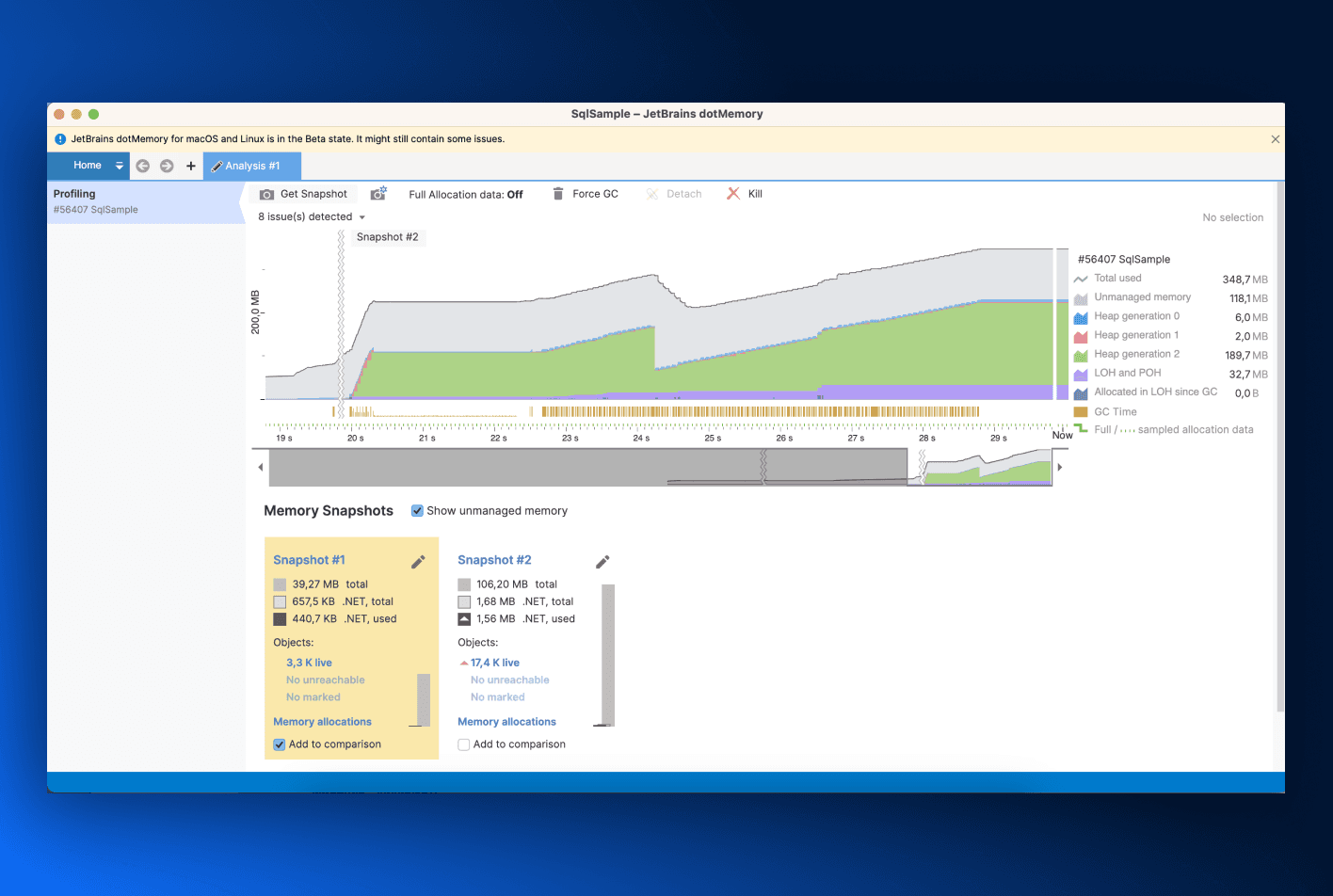
JetBrains dotMemory
The .NET memory profiler, rebuilt on Avalonia so one codebase serves the Windows, macOS and Linux editions.
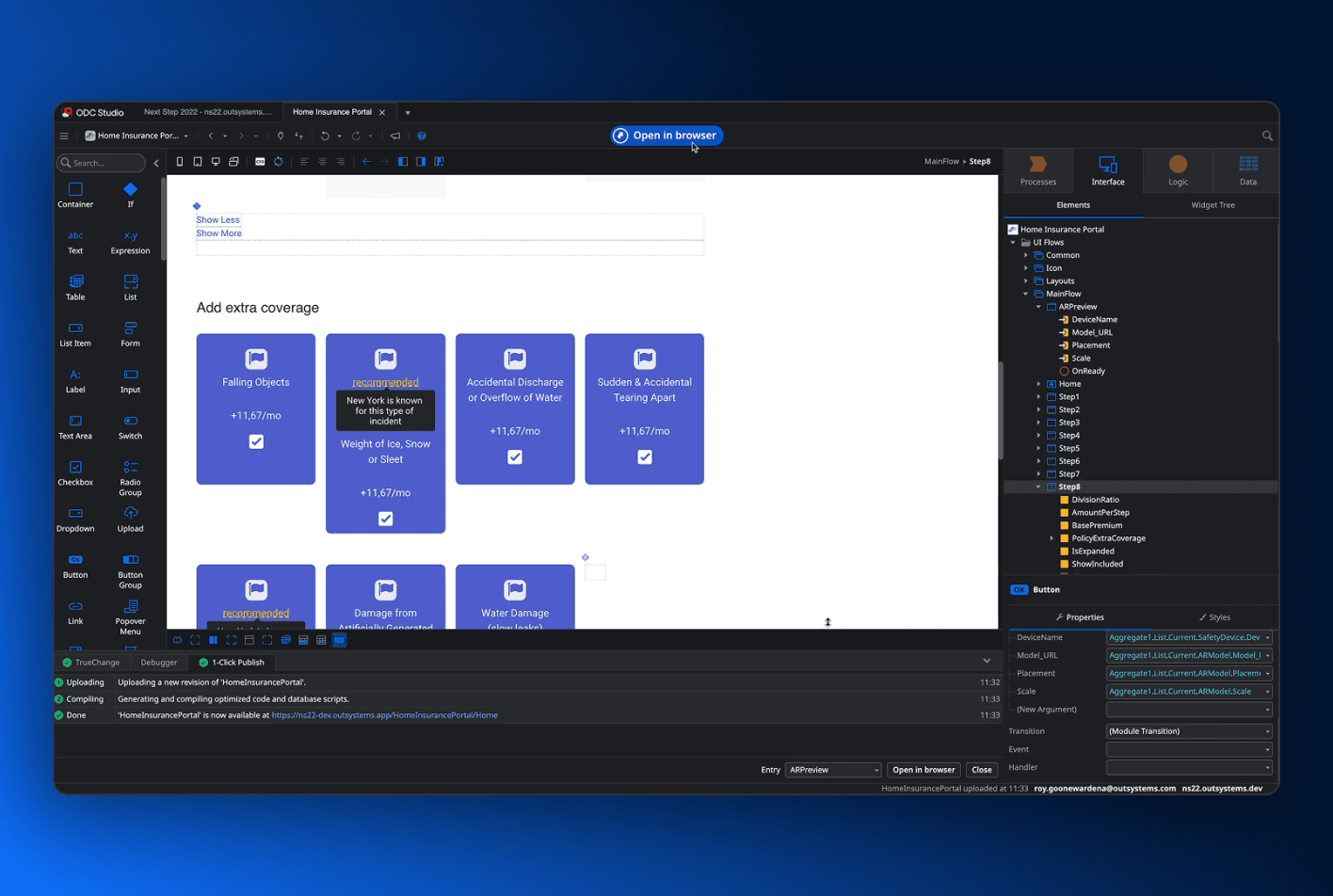
ODC Studio
The desktop studio for the OutSystems low-code platform, shipped for Windows and macOS from one project.
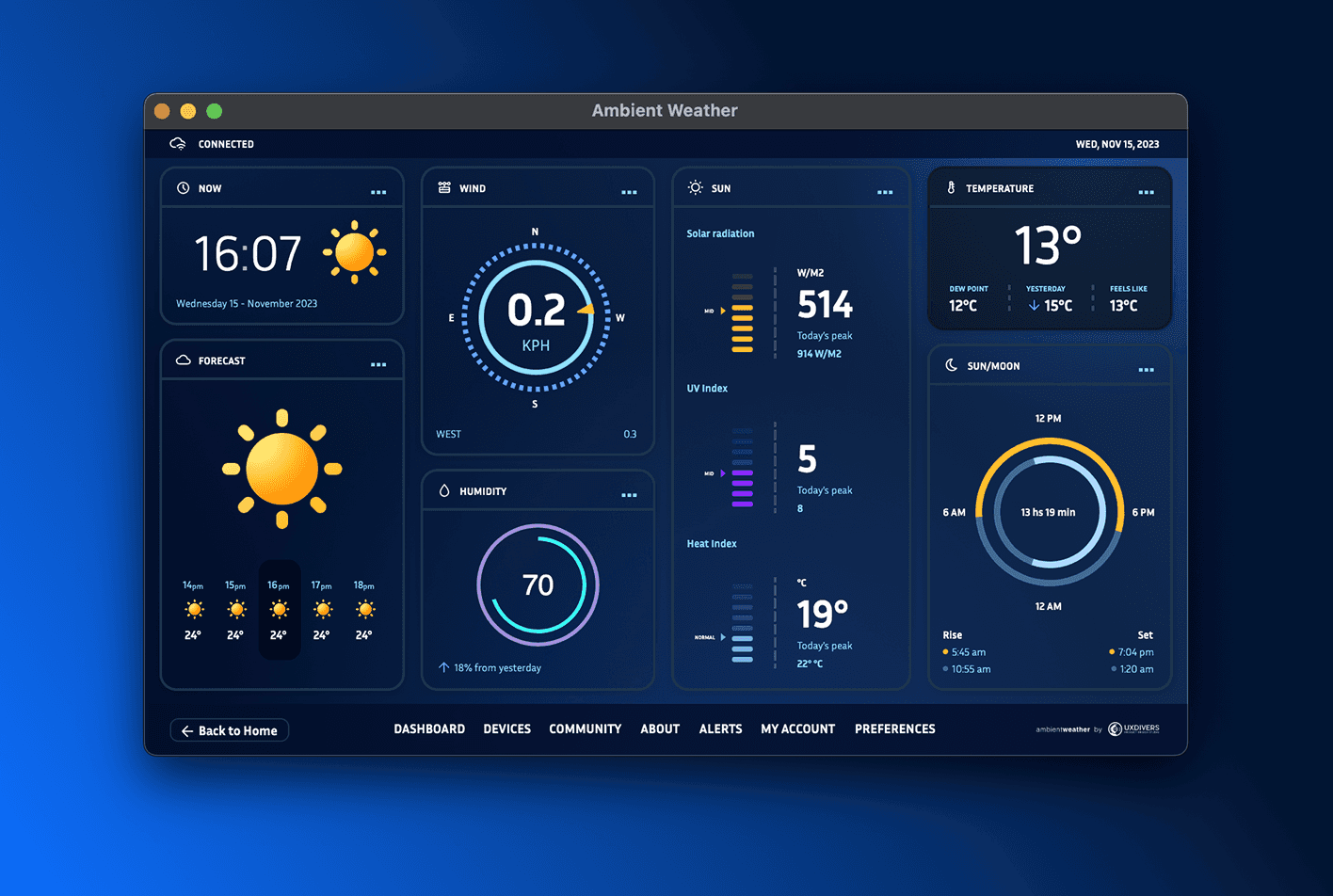
Ambient Weather HMI
A pixel-perfect interface by design studio UXDivers, drawn from one Avalonia codebase and built to run on low-power embedded Linux hardware.
The MAUI backend
We’re building MAUI’s Linux and browser support. Upstream, unforked, in the open.
The Avalonia backend for .NET MAUI keeps your MAUI code and replaces what draws it. Your pages, your view models and your XAML stay exactly as they are; Avalonia supplies the handlers, and the app picks up desktop Linux, embedded Linux and WebAssembly, with Windows and macOS running through the same renderer. It’s built with the .NET MAUI team.
We announced an Avalonia powered backend for .NET MAUI.
Desktop Linux, embedded Linux and WebAssembly, for MAUI codebases that keep their MAUI code. The same announcement put the macOS path at more than twice the performance of Mac Catalyst.
Javier Suárez joined us from the .NET MAUI team at Microsoft.
The progress update set out the architecture: one set of Avalonia handlers behind MAUI’s existing handler system, an ILayoutManager implementation, and SkiaSharp for graphics. Standard MAUI layout controls worked with no changes to them.
Preview 1 shipped and the repository opened.
Existing MAUI control galleries, GraphicsView, SkiaSharp.Views.Maui, WebView, animations and nested navigation all run, including under NativeAOT and trimming.
What we committed to before writing it
Anyone can say they’re collaborating with a framework team. These are the five constraints that make it true, and each one is something we gave up.
No fork of .NET MAUI.
The backend targets MAUI as Microsoft ships it. There is no parallel MAUI to maintain alongside it.
No custom target frameworks.
It builds against the target frameworks MAUI already publishes, so your project file stays a MAUI project file.
Every change goes upstream.
Work the backend needs lands in the official .NET MAUI repository, where it benefits everyone building on MAUI.
No internal-visibility tricks, no IL rewriting.
Anything that only works by reaching past a public API is a maintenance bill we would be handing you.
General third-party integration, not an Avalonia carve-out.
The extension points we needed are open to any renderer, which is why they were accepted upstream at all.
Moving across
You don’t have to decide all of it today.
There are three ways into Avalonia from a MAUI codebase, and only one of them is a rewrite. The first is the cheapest to try: ship to Linux or the browser on the existing app, then decide about the rest with something running in front of you. None of them asks you to decide about the others.
Keep the whole codebase
Change what draws your MAUI app, not the app.
One package, the net11.0 target framework (.NET 11 preview SDK today) and one builder call. Pages, view models and XAML are untouched.
Keep the controls
Move the app across and bring the components with it.
Avalonia.MAUI Hybrid, also a preview, hosts MAUI-compatible controls inside Avalonia views on iOS and Android, so the migration can run one control at a time.
Keep the skills
Start the next project on Avalonia.
The same XAML, the same C#, the same MVVM patterns, and six targets out of one project. The table below shows what each MAUI concept becomes.
What your MAUI concepts become
Eight rows from the migration guide, which has the full table, the prerequisites and the verification steps. Styling is the one genuine relearn: MAUI targets by type, Avalonia by selector, with pseudo-classes for state.
Side by side
The whole comparison, including the parts that are a tie.
Twenty-five rows, no ticks and no crosses. Where the two frameworks answer the same way the row is set back, so what’s left in full contrast is the part of the decision that actually differs.
Where it runs
How it draws
What you bring with you
What ships with it
Who stands behind it
Backend rows describe Preview 1, announced in March 2026. Everything else describes both frameworks as they ship today.
FAQ
The questions
worth asking.
If you’re weighing this up for a real codebase and something here doesn’t cover it, ask us directly.
Nearly all of it. Avalonia is XAML and C# with the same MVVM patterns, the same data binding concepts, styles, templates and resources, and it works in Visual Studio, VS Code and Rider. The main things to relearn are Avalonia’s styling system, which is closer to WPF than to MAUI, and the control library. Our MAUI migration guide maps each MAUI concept to its Avalonia equivalent.
MAUI Essentials works as a standalone package alongside Avalonia for the device APIs it covers, and where it doesn’t fit, the migration guide’s recommendation is a direct platform API call behind your own interface. CommunityToolkit.Mvvm works unchanged. On the Avalonia backend for MAUI, an Essentials package is being written so a MAUI app keeps the same calls on Linux and the browser.
Like all good questions, it depends. Native controls give MAUI an immediately familiar appearance and behaviour on each operating system, and can inherit new platform conventions with less work. Avalonia renders its own controls, which provides consistent behaviour across platforms and complete control over every part of the interface. That doesn’t mean an Avalonia app must look identical everywhere. You can theme it to closely match the platform it is running on, then deliberately diverge wherever your product needs stronger branding, denser workflows or custom interactions. Projects such as Material.Avalonia demonstrate just how completely Avalonia’s visual language can be transformed.
Linux is a first-class Avalonia target, built and maintained by the same team that builds Avalonia itself. We’re also working with Microsoft to bring that Linux support to .NET MAUI through the Avalonia backend. From .NET 11, the official .NET MAUI app template can generate an Avalonia-powered desktop target that runs on Linux, Windows and macOS. That integration is already available in the .NET 11 previews.
Microsoft has continuously invested in .NET and we love this! The build on MAUI, so improvements to it land in the backend we ship, and the changes our work needs go upstream into the official repository where they benefit everyone. No release closes the difference described here, because it’s an architectural choice. A framework that maps onto the platform’s widgets and a framework that draws its own reach different sets of platforms and hand you different amounts of control, and that stays true however good either one gets.
Avalonia has commercial control vendors including Actipro, Eremex, yWorks, Iron Software, Stimulsoft, Fast Reports, Steema, MindFusion, Combit, and many more. We alo ship first-party pro components for charts, rich text editing, tree data grids, markdown and media playback. If you have MAUI-compatible controls you don’t want to give up, Avalonia.MAUI Hybrid can host them inside Avalonia views on iOS and Android.
Just because Avalonia draws its own UI doesn’t mean accessibility is an afterthought. Avalonia implements native accessibility APIs directly: UI Automation on Windows, NSAccessibility on macOS, platform services on iOS/Android, and full Linux support added in Avalonia 12. Your controls expose native automation peers, meaning screen readers and keyboard navigation work exactly like they do in native apps, and we are continuously shipping improvements to expand these capabilities.
Run your MAUI app on Linux this afternoon.
One package, one target framework and one builder call on the project you already have, and you can see it on a platform it couldn’t reach yesterday. Avalonia is MIT licensed and the backend preview is public.