Fast, full featured and highly customizable.
Accurate rendering, a full annotation toolset, text search, redaction, forms, bookmarks, printing and sharing in one Avalonia control targeting desktop, mobile, and as WebAssembly in the browser.
Trusted by .NET teams around the world
Features
A complete PDF viewer, in one control.
Set a Source and the document renders with navigation, search, annotations, forms and printing already wired up, on every platform Avalonia supports.
Accurate rendering
A proven rendering engine with a bespoke implementation on top for robust PDF specification support. Pages render sharply on retina and high-DPI displays, in process on desktop and mobile and as WebAssembly in the browser.
View modes and virtualisation
Single page, continuous and two-page view modes, with page virtualisation so navigation and scrolling stay fast on large documents and memory usage is efficient.
Navigation and links
Easy page navigation with page thumbnails and go-to-page controls, a document outline, page labels, and internal and external links that resolve to their destination or open in the browser.
Zoom, shortcuts and gestures
Zoom in and out, fit page, fit width and actual size; a full keyboard shortcut set; and pinch, swipe and long-press gestures on touch and trackpad.
Text and search
Text selection with copy and a context menu, full-text search with highlighted results and next and previous, and page or whole-document text extraction.
A full annotation toolset
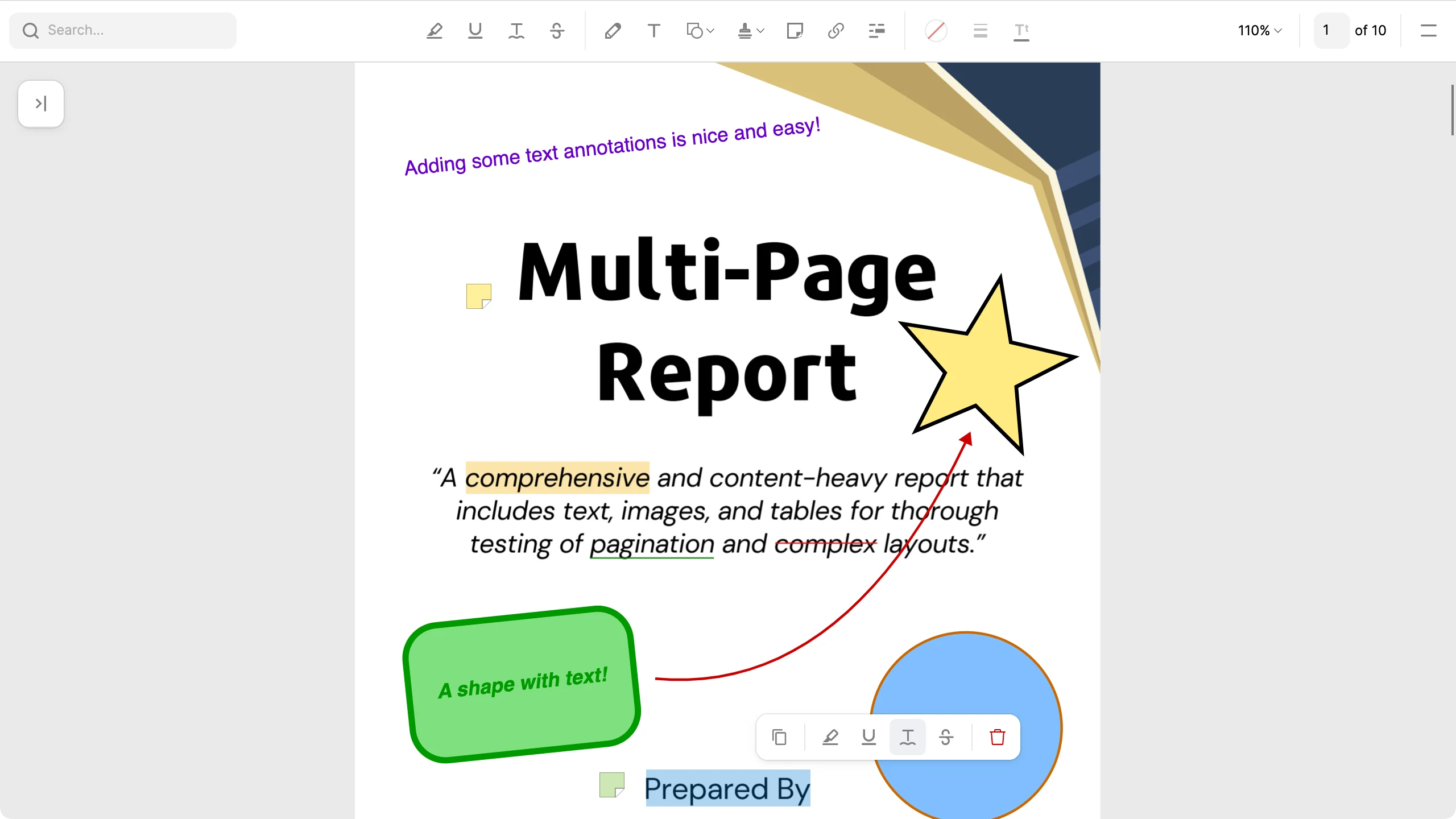
Highlight, underline, strikeout, squiggly and redaction, freehand drawing, shapes, text boxes, sticky notes, links and rubber stamps, with undo and redo across all of it.
Spec-compliant output
Appearance streams are written for everything, so edits render and stay editable in Acrobat, Preview and Chrome. Save in place, save a copy, save to a stream, or auto-save after each edit.
Interactive forms
Form filling with keyboard input. Tab into the document to reach the first field, then Tab between fields with a visible focus ring. Form edits take part in undo and redo.
Highly customizable
A visibility switch for every tool, file menu entry and the sidebar, flags for annotations, forms, saving and selection, default colours, zoom bounds and every user-facing string. Theme brushes and pseudo-classes cover the look.
Native print and share
The native print dialog and share sheet on Windows, macOS, iOS and Android, with the current edits included. On Linux and in the browser, handle the request and take the PDF bytes yourself.
Themes and chrome
Default (clean) and Fluent themes, each with light and dark palettes. An adaptive toolbar with overflow, and a compact layout that switches in on phones and constrained screens.
Every platform, one package
The same experience and features on Windows, macOS, Linux, iOS, Android and WebAssembly from one NuGet package, each app head pulling only its own native binaries.
Functionality
Everything a reader expects, inside your app.
Annotate, stamp, redact, search, fill forms and print in the control itself. Each tool is a property you can hide or a flag you can disable, so the viewer fits the document and the user in front of it.
Annotations
Highlight, underline, strikeout and squiggly from a selection. Draw freehand, add lines, arrows, rectangles, circles, polygons, stars and text boxes, or drop a sticky note with an in-place editor. Every annotation can be selected, moved, resized, restyled, copied, pasted, nudged with the arrow keys and deleted; with undo/redo for all annotations and editing actions. Annotations made in Acrobat or Preview keep their author, dates and appearance when edited here, and Cyrillic, Greek or CJK text is embedded as a font subset so it reads the same in every viewer.
WebAssembly demo
Try the PDF Viewer in your browser
Here is the control compiled to WebAssembly and running in the browser. With a sample report loaded, you can navigate it, search it and annotate it!
Setup
Simple installation and implementation.
Add the package, drop the control into your view, and bind it. There is no renderer to configure and no per-platform code to write.
Add the PDF Viewer package to your project
dotnet add package Avalonia.Controls.PdfViewerInclude your Avalonia UI license key in the executable project file .csproj
<ItemGroup>
    <AvaloniaUILicenseKey Include="YOUR_LICENSE_KEY" />
</ItemGroup>Include one of the two themes in App.axaml. Default brings its own palette; Fluent follows your FluentTheme
<Application.Styles>
    <FluentTheme />
    <StyleInclude Source="avares://Avalonia.Controls.PdfViewer/Themes/Default.axaml" />
</Application.Styles>
Customer stories
"Avalonia has a very strong community, and frankly is a joy to work with."
Bill Henning
CEO & Founder, Actipro Software




Pro features
PDF Viewer is included with Pro.
One subscription carries all seven premium components, 70+ chart types and the advanced tooling. Nothing on this page is a separate purchase.
Included components
FAQ
Your questions,
answered.
Can't find what you need? We're here to help.
No. This component is part of the Avalonia Pro and Enterprise tiers. Activation requires an Avalonia account and a valid Pro or Enterprise licence.
Yes. Each component gives you a ready UI out of the box, but you can build a bespoke interface by using the underlying classes directly and wiring up your own commands and visuals.
Supported formats depend on the underlying platform. Check the component's documentation and the platform's own capability lists for specifics.
Avalonia UI components support Windows, macOS, Linux, iOS, Android, and WebAssembly. Each component uses the native platform back-end for optimal performance and compatibility.
Put a PDF viewer in your app
Try PDF Viewer free for 30 days. Rendering, search, annotations, forms and much more in one control, on every platform Avalonia supports.