Avalonia for developers

One C# and XAML codebase for desktop, mobile, the browser and embedded.

Trusted by industry leaders and developers worldwide

One UI codebase, in C# and XAML you already know.

One codebase

Write the UI once.

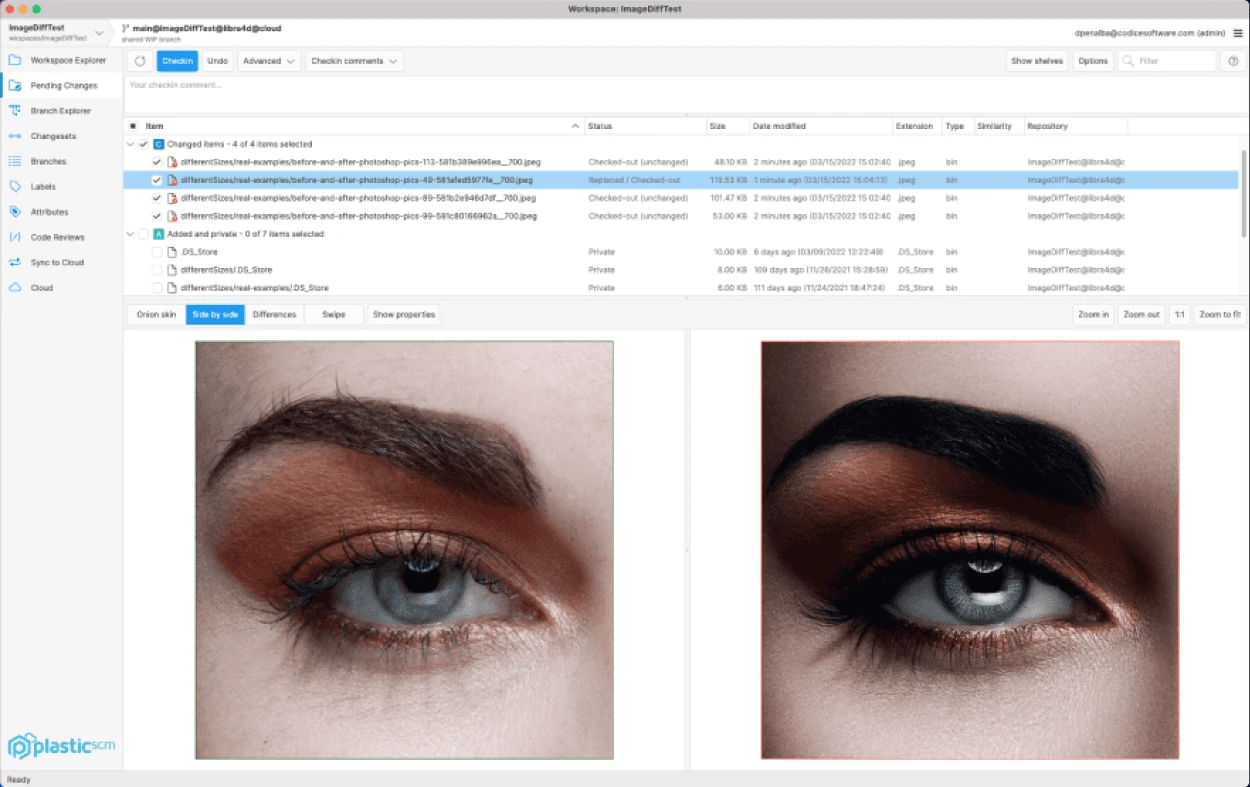
Avalonia draws every control itself, so one XAML view renders the same on Windows, macOS, Linux, iOS, Android and the browser. Unity’s version control team went from three UI codebases to one.

  • No per-platform UI layer
  • Same layout and styles on every OS
  • Platform APIs when you need them
Unity’s version control client, comparing two versions of a photograph side by side under a list of changed files

Your skills

XAML you already know.

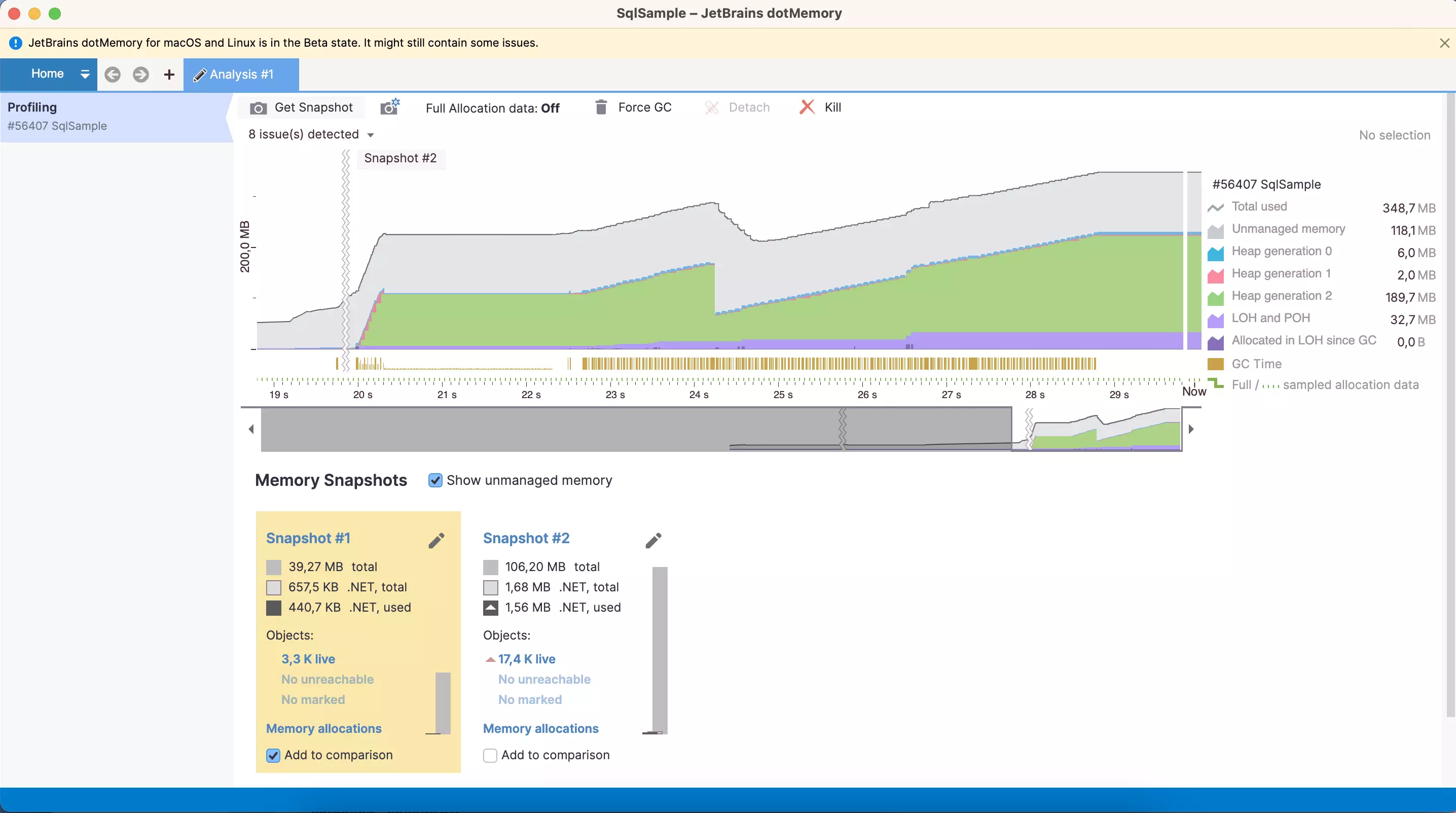
Bindings, templates and MVVM carry over from WPF, and styles add CSS-like selectors. JetBrains moved dotMemory and dotTrace from WPF to Avalonia to ship them on macOS and Linux.

  • C# on .NET 8 and .NET 10
  • Compiled bindings, checked at build
  • CommunityToolkit.Mvvm or ReactiveUI
JetBrains dotMemory profiling a .NET process on macOS: a memory timeline with snapshot markers, the heap generations and two snapshots side by side

Tests

Test the UI without a screen.

The headless platform runs your controls, layout and bindings in memory, so UI tests are ordinary xUnit or NUnit tests in CI. Unity runs about 6,000 of them in four minutes.

  • Simulated keyboard and mouse
  • Frames to compare with a baseline
  • Runs on any build agent
[AvaloniaFact]
public void Pressing_Enter_sends_the_transfer()
{
    var view = new TransferView();
    var window = new Window { Content = view };
    window.Show();

    view.AmountBox.Focus();
    window.KeyTextInput("250");
    window.KeyPressQwerty(PhysicalKey.Enter, RawInputModifiers.None);

    Assert.Equal("Sent €250.00", view.Status.Text);
}

Go as low-level as you need.

Draw with Skia, host a platform view or compile ahead of time. It’s all C#.

Draw anything.

Override Render and draw with DrawingContext. For charts, games and 3D, lease the SkiaSharp canvas itself.

  • Shapes, text, images and geometry
  • The SkiaSharp canvas, leased
  • Drawing on the render thread
public class SimpleCircle : Control
{
    public override void Render(DrawingContext context)
    {
        var center = new Point(Bounds.Width / 2, Bounds.Height / 2);
        var radius = Math.Min(Bounds.Width, Bounds.Height) / 2 - 4;

        context.DrawEllipse(
            Brushes.CornflowerBlue,
            new Pen(Brushes.Navy, 2),
            center,
            radius,
            radius);
    }
}

Host a native view.

NativeControlHost puts a platform control in your layout. For everything else, TopLevel hands you the HWND, NSWindow or X11 handle.

  • Native maps, players and browsers
  • Window handles on every platform
  • P/Invoke with LibraryImport
public class NativeTextEditor : NativeControlHost
{
    protected override IPlatformHandle CreateNativeControlCore(
        IPlatformHandle parent)
    {
        if (OperatingSystem.IsWindows())
        {
            var hwnd = CreateWindowEx(0, "EDIT", "",
                WS_CHILD | WS_VISIBLE | ES_MULTILINE,
                0, 0, 100, 100,
                parent.Handle, IntPtr.Zero, IntPtr.Zero, IntPtr.Zero);

            return new PlatformHandle(hwnd, "HWND");
        }

        return base.CreateNativeControlCore(parent);
    }
}

Compile ahead of time.

Native AOT publishes a self-contained app with no JIT, and Avalonia 12 rebuilt the Android backend. The figures compare 12.0 with 11.x.

  • One property in the project file
  • Smaller output with trimming
  • No .NET runtime to install
Avalonia 12.0 against 11.x, on Android
  • Startup timeNativeAOT

    4× faster
    11.x
    1,960 ms
    12.0
    460 ms
  • Scroll FPS

    3× smoother
    11.x
    42 fps
    12.0
    120 fps
  • Animation FPS

    60 FPS target
    11.x
    49 fps
    12.0
    60 fps
  • Idle CPU usage

    20× lower
    11.x
    0.20%
    12.0
    0.01%

Works in the editor you use.

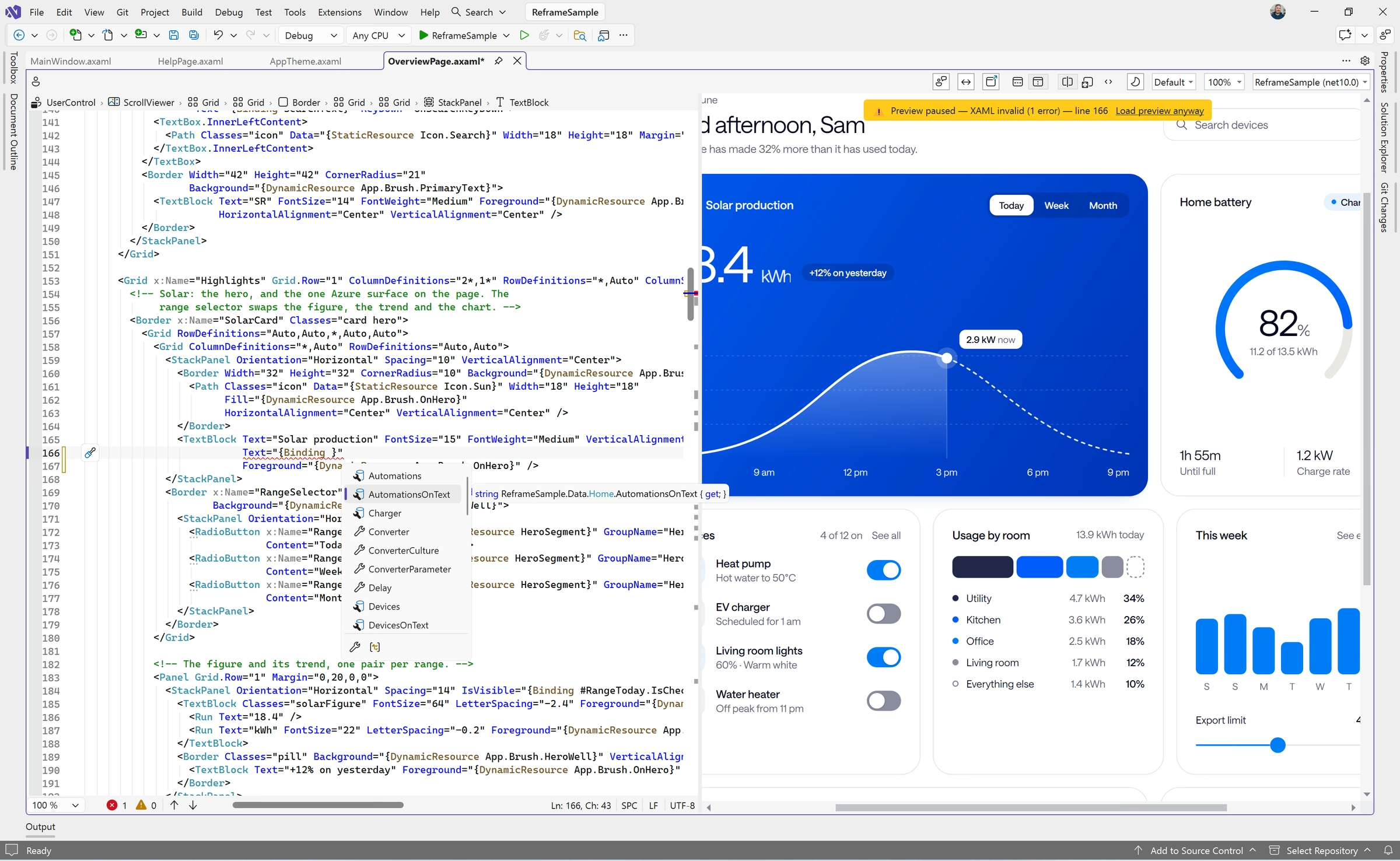
Visual Studio, VS Code and Rider all edit Avalonia XAML with a live preview.

Visual Studio

XAML and a live preview in Visual Studio.

Our extension adds IntelliSense and a docked previewer. The free Community edition is limited and for personal projects only, so work needs Plus.

  • XAML IntelliSense and previewer
  • Enhanced errors and warnings
  • Go to definition and Quick Info
Avalonia for Visual Studio: completion inside a binding listing Helio’s own view-model properties, beside the docked live preview of the dashboard it describes

JetBrains Rider

Rider ships with Avalonia support.

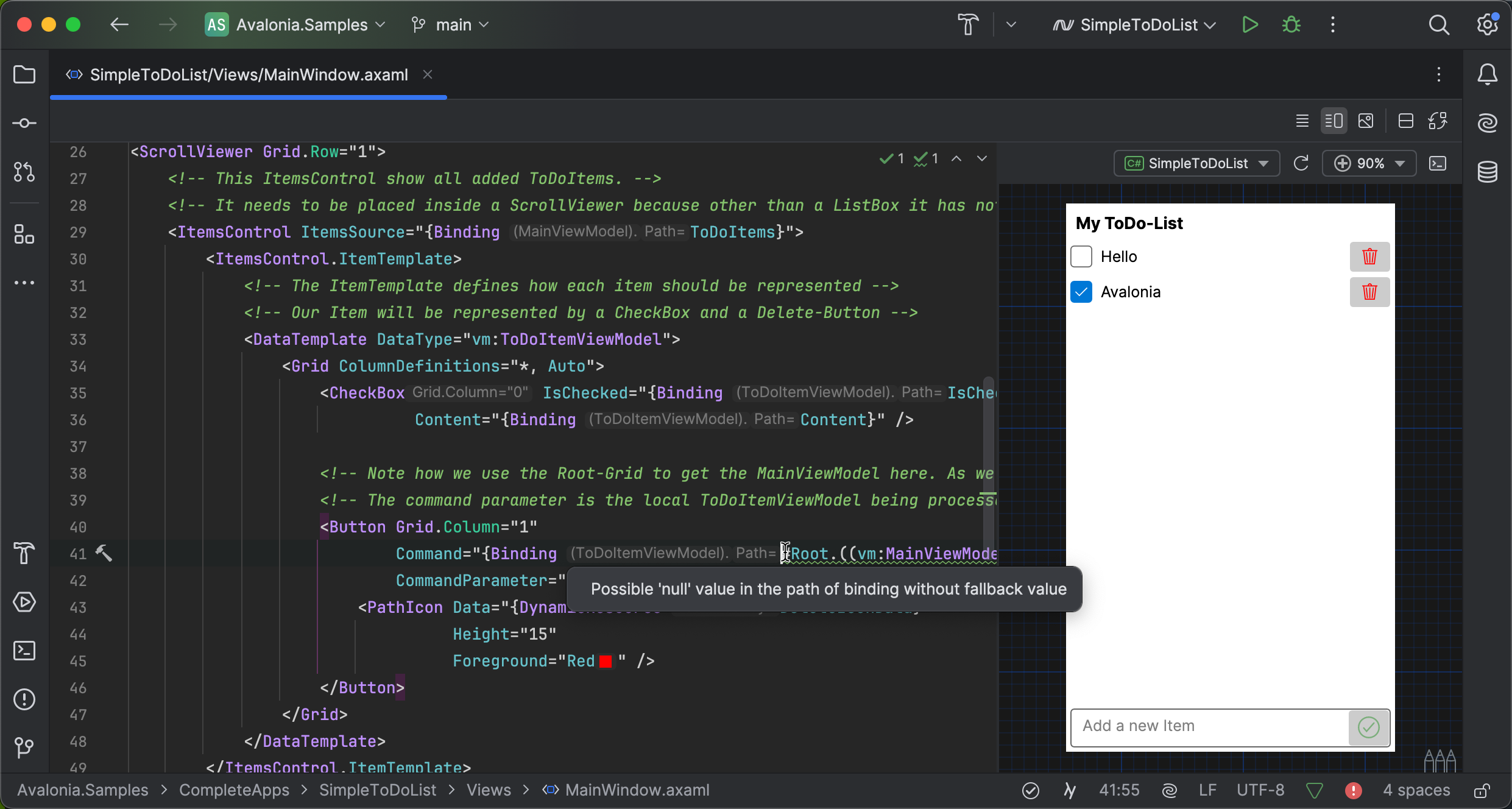
JetBrains builds XAML completion, navigation, refactoring and a live preview into Rider. Its inspections flag a binding path that could be null.

  • Live XAML preview
  • Binding inspections
  • Refactoring and navigation
JetBrains Rider editing the XAML of an Avalonia to-do list, with the running view previewed on the right and an inspection warning on a binding path that could be null

VS Code

Our VS Code extension is free.

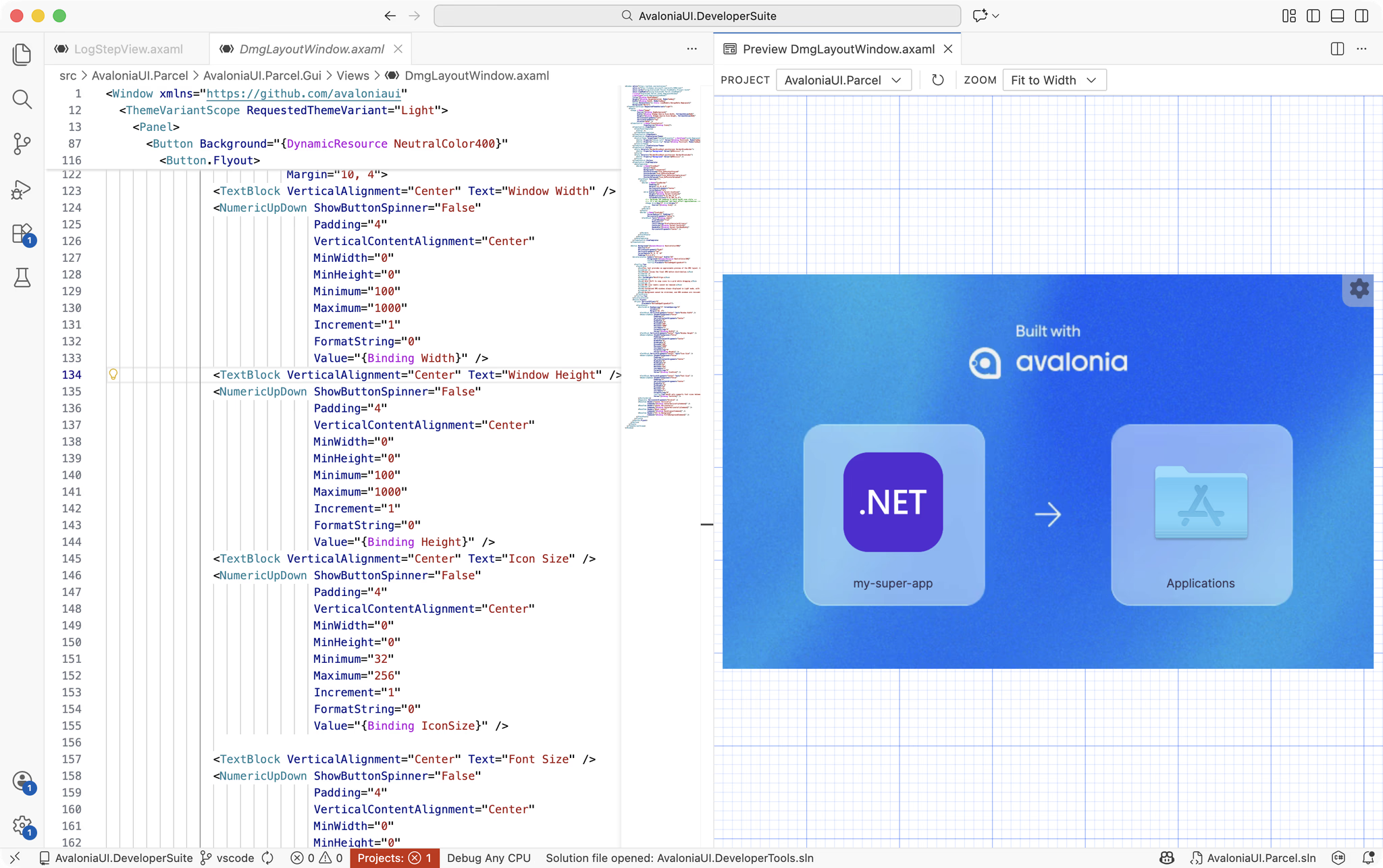
XAML IntelliSense and a live previewer, with no account, for commercial work too. Refactoring, the outline and the toolbox need Plus.

  • XAML IntelliSense
  • Live previewer
  • No account needed
Avalonia for VS Code: Helio’s Overview XAML on the left and its live preview on the right, with the Avalonia toolbox in the side bar

Build MCP

Your assistant reads the current docs.

Build MCP is a hosted server your AI assistant calls before it writes Avalonia code. Add it to your editor and it’s connected.

  • Free, with no licence key
  • Docs, API reference and expert rules
  • WPF migration tools included
In your terminal
# Add the server
claude mcp add --transport http avalonia-docs \
  https://docs-mcp.avaloniaui.net/mcp

# Check it's connected
claude mcp list

In the open

Check the numbers yourself.

The framework is built in public on GitHub. Every figure here links to where we counted it.

Avalonia releases in 2026

To 18 November 2026

  • Avalonia 1213 releases

    Avalonia 12: 12.0.0 on 7 April, 12.0.1 on 13 April, 12.0.2 on 28 April, 12.0.3 on 11 May, 12.0.4 on 28 May, 12.0.5 on 23 June, 12.1.0 on 9 July, 12.1.1 on 29 July, 12.1.2 on 2 September, 12.1.3 on 22 September, 12.1.4 on 9 October, 12.1.5 on 2 November, 12.1.6 on 9 November.

  • Avalonia 11.313 releases

    Avalonia 11.3: 11.3.11 on 13 January, 11.3.12 on 12 February, 11.3.13 on 28 March, 11.3.14 on 13 April, 11.3.15 on 11 May, 11.3.16 on 19 May, 11.3.17 on 27 May, 11.3.18 on 23 June, 11.3.19 on 6 August, 11.3.20 on 10 August, 11.3.21 on 8 September, 11.3.22 on 11 September, 11.3.23 on 9 November.

911

Pull requests merged

In 2026 so far, each one public on GitHub.

26

Stable releases this year

Avalonia 12 and 11.3, patched side by side.

340+

Contributors

People with commits in the repository, team and community.

30M+

NuGet downloads

Of the core Avalonia package alone.

Counted on 18 November 2026.

FAQ

Your questions,
answered.

Can't find what you need? We're here to help.

No. It draws its own with Skia, so a view looks and behaves the same everywhere and your styles decide the look. When you need a platform control, NativeControlHost hosts one, drawn on top of your Avalonia content.

View models, services and most of what you know about XAML carry over, but the XAML itself needs porting, because namespaces, styles and some controls differ. To run an existing WPF app on macOS and Linux without porting it, there’s Avalonia XPF.

Avalonia 12 targets .NET 8 and .NET 10. Avalonia 11.3 also targets .NET Standard 2.0, so it runs on .NET Framework, and it’s still patched.

Yes. Controls report to UI Automation on Windows, NSAccessibility on macOS and AT-SPI on Linux, and iOS and Android are supported too.

Yes: Reframe, which is part of Avalonia Plus and free for everyone while it’s in preview. The preview is coming soon, and Visual Studio, VS Code and Rider all have a live XAML previewer today.

Avalonia draws its controls, and MAUI wraps each platform’s own. We’re building an Avalonia backend for .NET MAUI with Microsoft’s MAUI team, which brings MAUI apps to Linux and the browser.

Ask in GitHub Discussions or open an issue, both in public. A guaranteed response time is part of Avalonia Enterprise.

The framework is MIT licensed and free for commercial use, and so is the VS Code extension. Plus adds the full tools, Pro adds premium controls and Enterprise adds support. See pricing.

Build your first Avalonia app.

Two commands to a running window, then the setup for your editor.