Avalonia vs WinForms
One wraps the Windows controls of two decades ago; the other draws a styled, resolution-independent UI on six platforms. What that changes for a .NET team, what stays reusable, and how to move one control at a time.
How they differ
Both are .NET. The UI is a generation apart.
WinForms is the most direct route ever built onto a Windows form: drag a control, double-click it, write the handler. That directness comes from wrapping what Windows already provides, and the wrap is also the ceiling: what Windows draws, only Windows can draw. Avalonia draws the interface itself, which changes what a control is, how it’s styled, and where the application can go.
XAML views over view models, beside the rest of your .NET code.
Forms and code-behind, largely generated by the designer.
Composed and rendered by the framework, identical on every platform.
User32 underneath, GDI+ for drawing; Windows decides how it looks.
One style restyles a thousand controls; light and dark are variants.
Appearance set control by control; custom looks are hand-drawn.
One project, with embedded Linux beyond the desktop.
The wrapper needs the thing it wraps.
A UI system that draws your app wherever .NET runs.
The fastest path ever built onto a Windows form.
Why it matters
The wrapper is the productivity and the ceiling at once. Because Windows supplies the controls, WinForms development is famously fast to start. And because Windows supplies the controls, styling stops at properties and owner drawing, theming stops at the system’s colours, and the platform list stops at one. None of that is neglect; it’s the architecture doing exactly what it says.
Day to day
Placed and painted, or composed and drawn.
The architecture difference stops being abstract in three places a team touches every week: how screens hold together, how the product looks, and how data gets to the glass.
Layout
Coordinates age. Composition doesn’t.
A form places controls at positions, with anchoring, docking and layout panels layered on, and DPI awareness is an opt-in mode Microsoft has kept improving release by release. Avalonia lays out by composition: panels measure and arrange, and rendering is resolution-independent, so a screen built once holds together across sizes, scales and monitors.
Appearance
Restyle the app, not each control.
WinForms appearance is set per control, with visual styles being “Visual styles are the colors, fonts, and other visual elements that form an operating system theme” and custom looks owner-drawn; dark mode arrived as a built-in in .NET 10, working by swapping system colours. In Avalonia, styles select across the tree the way CSS does, themes are variants, and a brand refresh is an edit rather than a control-by-control campaign.
Data on screen
From event wiring to binding.
The migration guide calls the move from event handlers to binding and MVVM “the biggest mindset shift from WinForms”, and it’s the change that pays longest: state lives in view models, the UI observes it, and tests reach logic without a form. For dense data, TableView ships free in the core package and TreeDataGrid extends it for editing and hierarchy in the Pro tier.
The decision
Your business logic isn’t stuck. The forms are.
Two decades of operational software run on WinForms, and the companies running it aren’t wrong to. The decision in front of those codebases is narrower than “rewrite or don’t”: it’s which layer is holding the product back, and whether that layer can be replaced without betting the rest.
The decision, in four parts
WinForms is maintained, and that isn’t the question.
“Each .NET release introduces a new version of Windows Forms (WinForms)”, and recent ones were substantial: .NET 10 integrated dark mode (“Windows Forms has fully integrated dark mode support”) and stabilised the async form APIs, and a .NET 11 preview is trialling a refreshed rendering pipeline. Nothing on this page argues that WinForms is dying. The argument is about what a wrapper can never do.
The ceiling is architectural, not fixable by releases.
A wrapper over User32 and GDI+ inherits Windows: its controls, its colours, its one operating system. Styling remains per-control properties and owner drawing; theming remains what the system exposes; and no future .NET release changes where User32 exists. The ceiling isn’t a missing feature. It’s the deal the model made.
The forms are a layer, not the codebase.
Services, domain logic, data access and the tests over them are .NET, and .NET runs everywhere Avalonia does. What’s genuinely WinForms-shaped is the forms layer and its event wiring, and that’s the layer the migration guide maps: designer files to XAML, Dock and Anchor to panels, handlers to bindings.
And the first control can ship inside the app you have.
Avalonia controls can be hosted inside an existing WinForms application through WinFormsAvaloniaControlHost, on Windows, so a team can prove the stack on one screen of the real product rather than a prototype. When the UI is Avalonia, the platform list opens; until then, nothing about the shipped app has to break.
Which one, for what
Sometimes the answer is staying on WinForms.
The trade is real. WinForms buys a famously direct start, inside one operating system’s walls. Avalonia buys a styled, testable, cross-platform UI, at the price of learning XAML and rebuilding the forms layer. Which price is right follows from what the software is for.
Choose Avalonia when
The UI is part of the product’s value.
- Users judge the product partly on its interface: branding, theming, dark mode and crisp scaling are product features, not polish.
- The product needs to exist beyond Windows: a macOS build for customers, Linux for industrial hardware, or the browser via WebAssembly.
- Screens have outgrown event wiring: you want state in view models, UI observing it, and tests that don’t need to open a form.
- The .NET underneath is worth keeping: services, domain logic and data access move as they are, and the rebuild is scoped to the forms layer.
- You want the option of starting inside the existing app, one hosted control at a time, before committing the whole product.
WinForms is a fair choice when
The tool is internal, Windows, and working.
- It’s an internal tool on managed Windows desktops, and drag-and-drop designer speed matters more than styling ever will.
- The team’s WinForms fluency is deep, the backlog is features rather than platforms, and retraining has a real cost this quarter.
- The app leans on commercial WinForms control suites that have no equivalent in your rebuild budget.
- The product is in stable maintenance, serving its users; software that works doesn’t need a comparison page.
Shipping today
Operational software, drawn rather than wrapped.
A drive utility, a shell-integrated launcher and an industrial HMI: the dense, workmanlike category WinForms is known for, built on Avalonia, from Windows desktops down to fan-less panels.
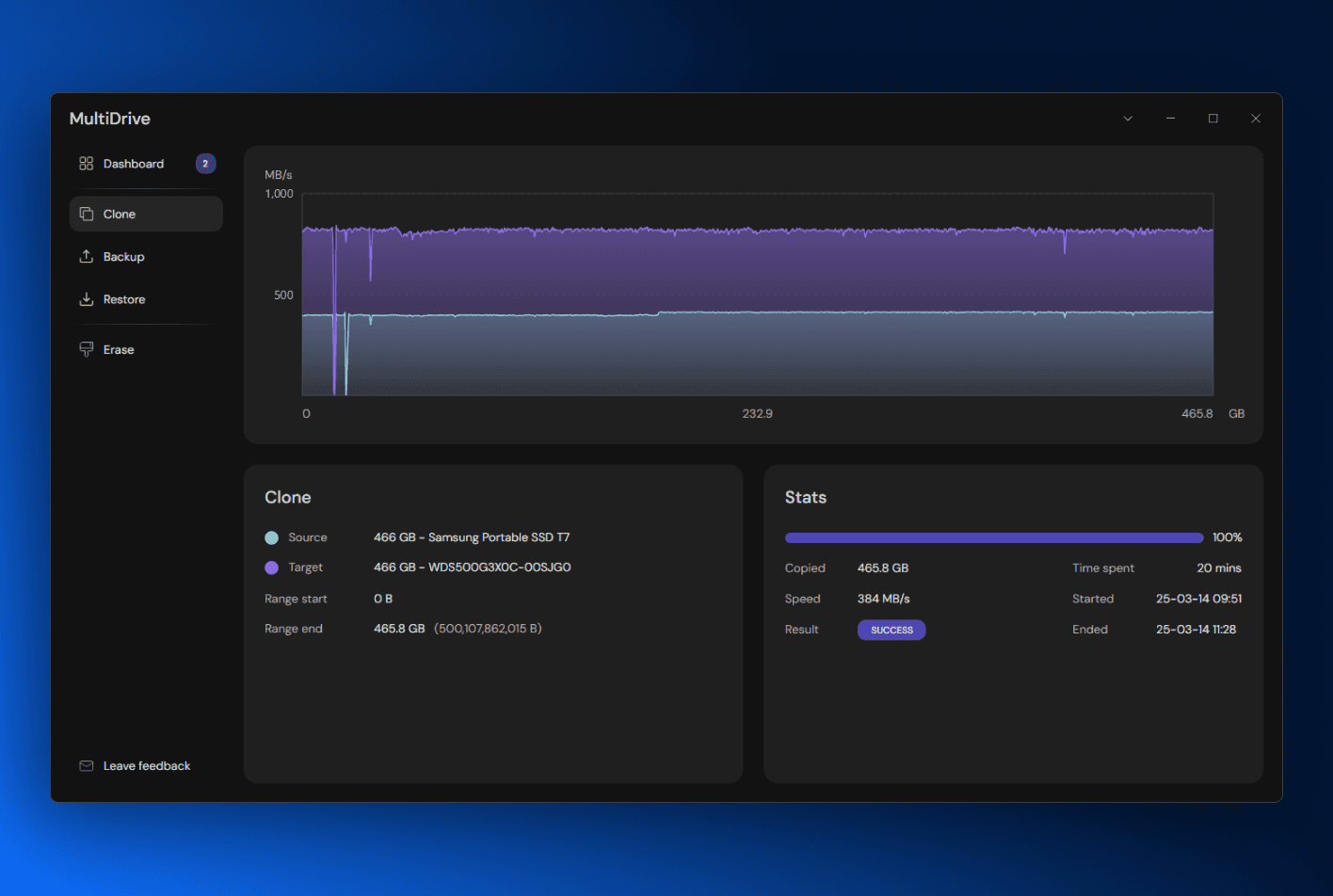
MultiDrive
Drive backup, cloning and restore for Windows, with a dense operational interface built entirely in XAML.
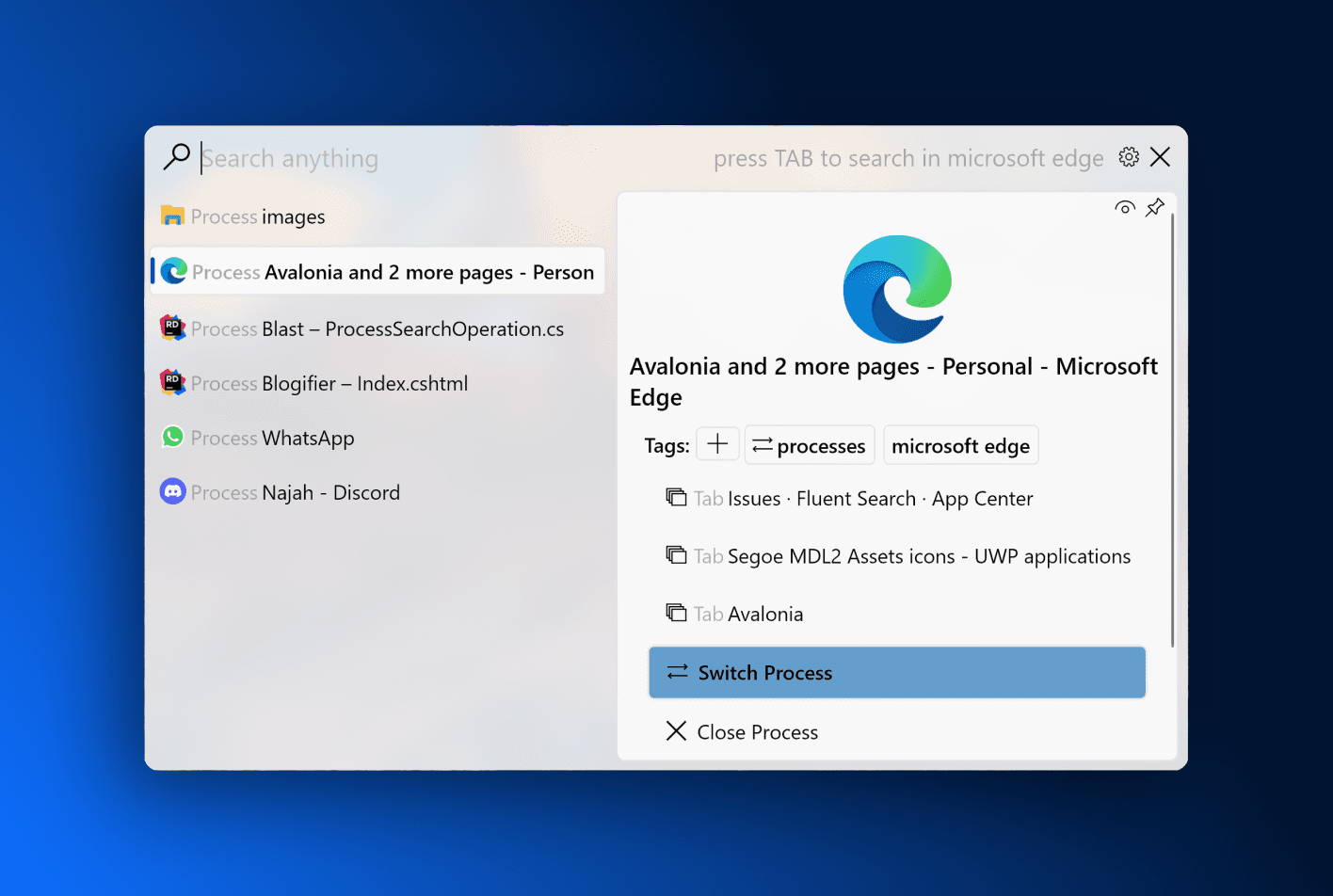
Fluent Search
Instant application, file and browser-tab search for Windows 10 and later. A Windows-only product that still chose the in-app stack.
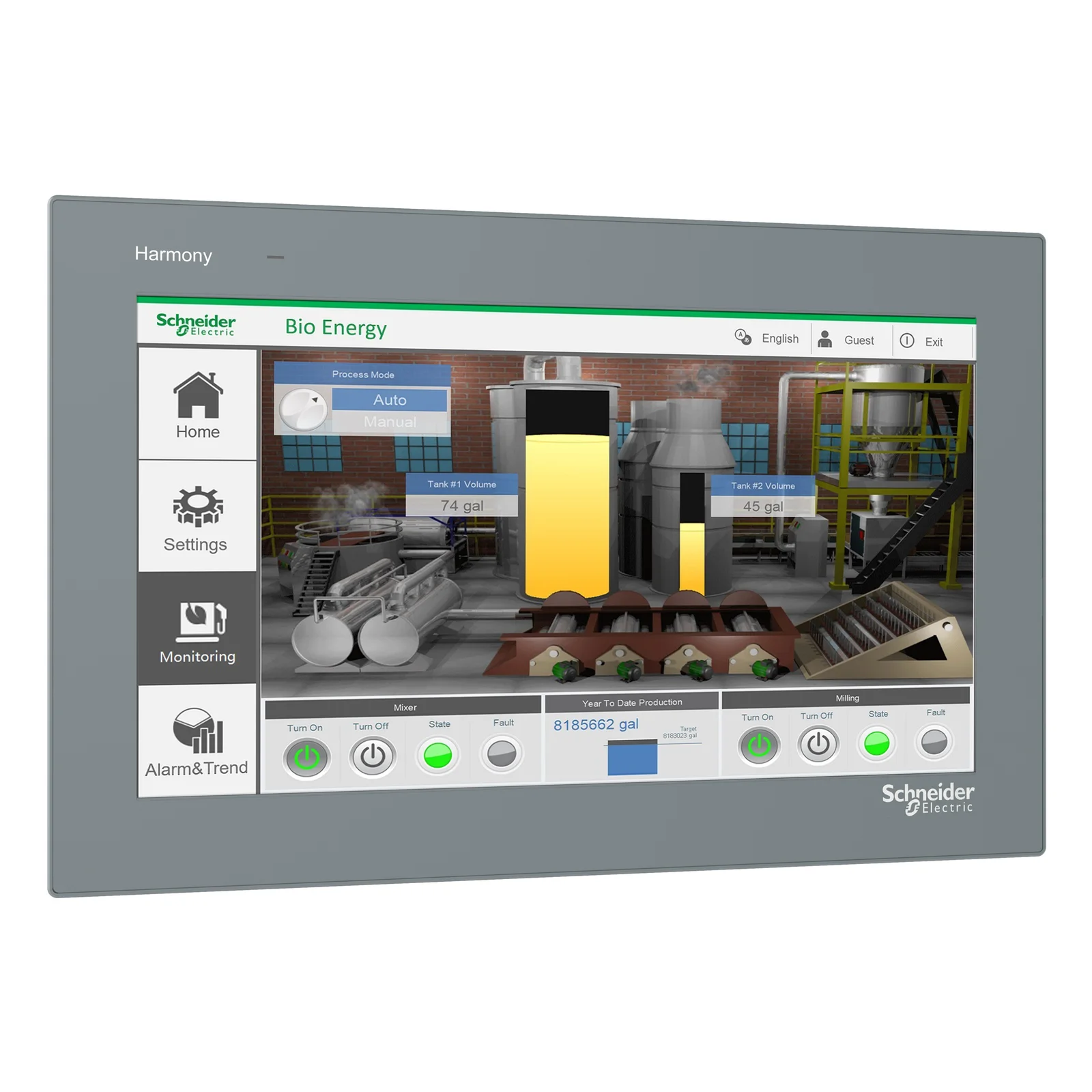
Schneider Electric Harmony
A generation of HMI graphics moved off Windows and onto Avalonia, rendering to the framebuffer on panels with as little as 512MB of RAM.
The working week
What a WinForms developer actually gives up, and gets.
A normal week, netted out: one loss stated plainly, and two places the move pays for itself.
Building UI
No drag-and-drop designer, and that’s the trade.
Microsoft’s pitch is real: “Windows Forms features a drag-and-drop visual designer in Visual Studio to easily create Windows Forms apps”. Avalonia’s workflow is XAML with a live previewer in Visual Studio, VS Code and Rider, plus DevTools inspecting the running app. Teams write layout instead of dragging it, which costs speed on the first form and pays it back the first time a screen has to resize, restyle or be reviewed in a diff.
Windows integration
Leaving WinForms isn’t leaving Windows.
Tray icons, shell association, toasts and hardware access all remain available: Avalonia applications call Win32 through ordinary P/Invoke and can host native views where one is genuinely needed. The Windows-ness a WinForms team relies on comes from .NET and the OS, and both are still there.
Deployment
From ClickOnce to every desktop.
A WinForms app deploys to Windows with ClickOnce or MSIX. An Avalonia app ships self-contained per platform, trims and compiles ahead of time where startup and footprint matter, and Parcel builds the installers for every target from one run. The same product, one pipeline, three desktops.
Side by side
The whole comparison, including the rows WinForms wins.
Nineteen rows, no ticks and no crosses. The designer row is WinForms’ in full contrast, and “The .NET you keep” ties on purpose: it’s the band’s claim, made checkable. Ties are set back.
Where it runs
The UI model
The .NET you keep
The lifecycle
WinForms rows were checked against Microsoft’s published pages in August 2026: the Desktop Guide overview, the dotnet/winforms repository, the what’s-new index and the .NET 10 release notes. When Microsoft’s pages change, so should this table; tell us if we’re behind.
FAQ
The questions
WinForms teams ask.
If you’re weighing this up for a real codebase and something here doesn’t cover it, ask us directly.
No. “Each .NET release introduces a new version of Windows Forms (WinForms)”, .NET 10 integrated dark mode and stabilised the async form APIs, and a .NET 11 preview is trialling a refreshed rendering pipeline. WinForms is maintained software with a real team behind it. What it also is, by its own repository’s description, is a wrapper over Windows UI libraries, and that’s the part no release changes: the styling model, the theming ceiling and the single platform are the architecture, not the backlog.
No. UI is written in XAML with a live previewer in Visual Studio, VS Code and Rider, and Avalonia DevTools inspects the running application. For a team fluent in the WinForms designer that’s a genuine workflow change, slower on the first form and faster on every screen that must resize, restyle or survive code review. If drag-and-drop assembly is the thing your team most values about WinForms, weigh this page with that trade in full view.
It’s a reasonable instinct, and the learning cost is similar: leaving WinForms for either framework means learning XAML, binding and MVVM. What the two destinations buy differs. WPF is a mature, actively maintained framework that runs, in Microsoft’s own words, only on Windows; the same learning investment on Avalonia buys the model plus Windows, macOS, Linux, mobile and the browser. If you’re paying the retraining cost once, it’s worth asking what reach it purchases. The WPF comparison covers that decision in its own terms.
Dense data UI is a design centre, not an afterthought. TableView ships free in the core package for virtualized, read-only tabular data, and TreeDataGrid, part of the Pro tier, adds editing and hierarchical grids. Layout is composed rather than pixel-placed, so operational screens survive resolution and scale changes, and the proof section above includes a drive utility and an industrial HMI for exactly this reason.
Keep the logic. Redraw the forms.
The .NET underneath your product already runs everywhere Avalonia does. Avalonia is MIT licensed, the migration guide maps every WinForms concept, and the first control can ship inside the app you already have.