Bring touch-friendly input to every screen
Effortless text input wherever a physical keyboard isn't practical. Designed for kiosks, tablets, and embedded systems.
Trusted by .NET teams around the world
Features
Text input for machines with no keyboard.
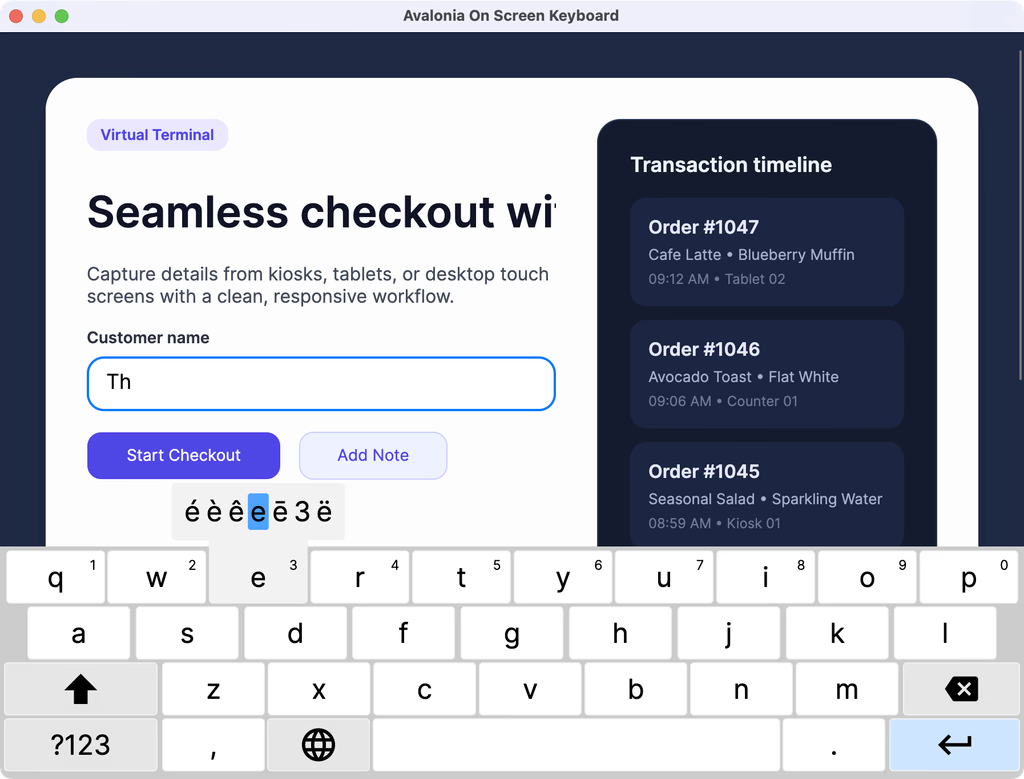
Built for kiosks, tablets and embedded panels: the keyboard follows focus, adapts its layout to the input type, and keeps the field being edited in view.
Optimised for embedded
Designed for efficiency, it runs smoothly even on low-power CPUs and GPUs.
Intelligent layout switching
Automatically adapts to text input types such as numbers, email, or URLs.
Seamless focus awareness
Opens and closes automatically as users interact with text fields.
Multi-language support
Easily configure and switch between multiple locales and input methods.
Adaptive screen positioning
Keeps the focused field visible, never hidden behind the keyboard.
Source included
EnterpriseFull source code provided with every licence for complete control.
WebAssembly demo
Try the Virtual Keyboard in your browser
Tap between form fields and watch the keyboard follow your focus, exactly as it would on a kiosk, compiled to WebAssembly.
Setup
Simple installation and implementation.
Add the package, drop the control into your view, and bind it. There is no renderer to configure and no per-platform code to write.
Add the OnScreenKeyboard package to your project
dotnet add package Avalonia.Controls.VirtualKeyboardInclude your Avalonia UI license key in the executable project file .csproj
<ItemGroup>
    <AvaloniaUILicenseKey Include="YOUR_LICENSE_KEY" />
</ItemGroup>Open your App.axaml file and include the following within the Application.Styles section
<Application xmlns="https://github.com/avaloniaui"
             xmlns:x="http://schemas.microsoft.com/winfx/2006/xaml"
             x:Class="YourNamespace.App">
    <Application.Styles>
        <FluentTheme />
        <!-- Include the Virtual Keyboard theme -->
        <StyleInclude Source="avares://Avalonia.Controls.VirtualKeyboard/Themes/Fluent.axaml"/>
    </Application.Styles>
</Application>
Customer stories
"Avalonia has a very strong community, and frankly is a joy to work with."
Bill Henning
CEO & Founder, Actipro Software




Pro features
Virtual Keyboard is included with Pro.
One subscription carries all seven premium components, 70+ chart types and the advanced tooling. Nothing on this page is a separate purchase.
Included components
FAQ
Your questions,
answered.
Can't find what you need? We're here to help.
No. This component is part of the Avalonia Pro and Enterprise tiers. Activation requires an Avalonia account and a valid Pro or Enterprise licence.
Yes. Each component gives you a ready UI out of the box, but you can build a bespoke interface by using the underlying classes directly and wiring up your own commands and visuals.
Supported formats depend on the underlying platform. Check the component's documentation and the platform's own capability lists for specifics.
Avalonia UI components support Windows, macOS, Linux, iOS, Android, and WebAssembly. Each component uses the native platform back-end for optimal performance and compatibility.
Make typing a breeze in your apps
Try On Screen Keyboard free for 30 days and give users effortless text input wherever a physical keyboard isn't practical. Built for kiosks, tablets, and embedded systems.